Followers

Thursday, February 24, 2011

Yummy Spring Rolls!

Hi Java Enthusiasts,


Once in a birthday party of a friend we visited one of the posh Restaurants of Hyderabad. Now, when in a party (F.R.E.E) we often resort to a methodology which never comes to our mind when we have to pay for ourselves. Here, therefore, we fell to our whims and fancies and thereby started to order "The Starters".  I was so hungry that I could have started with biscuits or even desserts, if you insisted. One of my eligible friends shouted, "I wish for Spring Rolls". 
And, today here I am. With Spring. Here in this article I am listing out the probable issues for the newbies in Spring world!


Helper Logs:
Server version: Tomcat 6.0.24
Spring version: 2.5
Notations used:
#Issue -- Mentions and describes the problem faced.
#(...) -- Describes the solution to the issue.
#Web-reference -- Refers to an article or forum thread discussing the same issue.


--------------------------------------------------------------------------------------------------------


#Issue -- The filename or extension too long: Unable to Create directory
Error trace: Cannot create spring-framework-3.1.0.M1\projects\org.springframework.integration-tests\src\test\java\org\springframework\context\annotation\jsr330\ClassPathBeanDefinitionScannerJsr330ScopeIntegrationTests.java


#(As a work around we have copied the original zip file to C: drive, shortened the name of the file and then unzipped it, thereby reducing the file path + file name by 50 characters.
Path limit is 248 characters.
Path+Filename limit is 260 characters.
Windows XP has a 255 character limit.
Windows Vista has a 260 character limit.)


#Web-reference: here


--------------------------------------------------------------------------------------------------------


#Issue -- Problems arising due to difference in versions of Server and Spring distribution @Omega location parallel work.


Error description:
I have been working on this project at Omega location also. I was not observing an appropriate response and results as in the tutorial. I wondered what were the problems.
#(Version matters. Sometimes in over enthusiasm, we tend to download and use the latest versions of the software and dependency libraries and jars. At the location Omega, I was using Tomcat 7 which has deprecated "InstallTask" and changed the user-Manager configurations. Therefore many features like the "List" were not working)


#Web-reference: here


--------------------------------------------------------------------------------------------------------


#Issue - Problems getting the third party jars.
#(Download the Spring 2.5 Final version with dependency jars. In the later versions the extra jars were pruned and the jar structure was made more complex and use oriented and less in number)


#Web-reference: here or to directly download the file here.


--------------------------------------------------------------------------------------------------------


#Issue
...\Spring\SpringTest\build.xml:85: taskdef class org.apache.catalina.ant.InstallTask cannot be found
#(InstallTask has been deprecated in Tomcat server 7, replaced by DeployTask. If you are working with versions before 7, it works fine)


#Web-reference: here


--------------------------------------------------------------------------------------------------------


#Issue
...\Spring\SpringTest\build.xml:85: java.lang.UnsupportedClassVersionError: Bad version number in .class file
#(Java version conflict caused due to multiple JVMs active within the system. One should always uninstall all the the JVMs and download the latest one and install. In the eclipse IDE we can then work with prior versions since the JVMs have backward compatibility for the compiler)


#Web-reference: here


--------------------------------------------------------------------------------------------------------


#Issue
Error trace: SEVERE: Servlet.service() for servlet jsp threw exception
org.apache.jasper.JasperException: /index.jsp(1,1) The absolute uri: http://java.sun.com/jsp/jstl/core cannot be resolved in either web.xml or the jar files deployed with this application


#(The dependent jars with the Spring 2.5.0 binary distribution has the jstl.jar and the standard.jar of the version 1.2. Using the both the jars of the version 1.1 resolves the issue. Please download jakarta-taglibs-standard-1.1.0.zip from here)


#Web-reference: here


--------------------------------------------------------------------------------------------------------


Yours JavaMad,
Sunit Ronnie Ghosh.

The $PATH less trodden!

Hi Java Enthusiasts,

I have recently been trudging the realms of Spring Framework. From the beginning of my Java days I have always been seen Java as a simple and worthy of its much discussed hype. As and when I walked the ways I came to know about many a complexities. As they say, complexities arise out of lack of comprehension.

Such, one concept which has been eluding me from the past was of the $PATH and the $CLASSPATH.

Most of the times, we developers seldom get the opportunity for setting up the JVM from scratch. Even if we do there is always a "hit and trial" approach or "find-read-execute-forget" approach to it.

{{THIS ARTICLE IS PRESENTLY UNDER EDIT MODE, READERS MAY OR MAY NOT SEE THE FULL ARTICLE YET}}

Thursday, January 20, 2011

Java Blog@Oracle , JavaSpotLight #13

Hi Java Enthusiasts,

Podcast #13 from Oracle's Java blog is out now, posted on Jan 19, 2011. In the 20:44 minute long podcast, the discussion focused on,


1. JDK 7 is feature complete: 

The JDK 7 project has reached Feature Complete (FC). This means that development and QA have finished all planned feature and test development work in the release and are moving the focus to testing and bug fixing on all supported JDK 7 platforms. This is a major step towards JDK 7 General Availability (GA) and implies that we are tracking close to the plan published on openjdk.java.net.

For more info, click here.


2. WebLogic 10.3.4 released:

Version 10.3.4 of Oracle WebLogic Server is now available along with the rest of the Fusion Middleware set of products. Here are some of the new features in this release :
• Exalogic Elastic Cloud Software Support
• Support for TopLink JPA 2.0 with patch 9923849
• Enhanced support for Oracle RAC with a Grid Link Data Source
• Certification with JAX-RS Jersey

For more info, please click here.


3. JPA 2.1 and JAX-RS 2.0 JSRs filed:

The formal work on Java EE 7 has started with the filing of two new JSRs :
JSR 338: Java Persistence 2.1
The Java Persistence API is the Java API for the management of persistence and object/relational mapping in Java EE and Java SE environments.

JSR 339: JAX-RS 2.0: The Java API for RESTful Web Services
This JSR will develop the next version of JAX-RS, the API for for RESTful (Representational State Transfer) Web Services in the Java Platform.

More info here.


4. Mac OSX Port:

The goal of this Project is to produce a high-quality, open source version of JDK 7 for the Mac. The final release has the following goals:

  • Pass all appropriate certification tests for Java SE 7
  • Include a complete, native Cocoa-based UI Toolkit
  • Provide excellent performance

More info here.


5. Feature Interview of Roberto Chinnici on Java EE Platform Lead on the futures in Java EE


Thanks and warm wishes!
Sunit Ronnie Ghosh

Saturday, January 15, 2011

Java Blog@Oracle , JavaSpotLight #12

Hi Java Enthusiasts,

Podcast #12 from Oracle's Java blog is out now, posted on Jan 13, 2011. In the 30:16 minute long podcast, the discussion focused on,


1. GlassFish webinar series : 

With GlassFish 3.1 soon to be released, and Java EE 6 still a very popular topic, the GlassFish Webinar Series has you covered on lots of different topics. That's no less than 12 webinars scheduled before the end of May to cover the Java EE programming model, various tools, what's new in GlassFish 3.1, clustering, admin, productivity, Coherence*Web integration, HK2, Security, Embedded and more.

Free registration for the webinar link is also available.

For more info, click here.


2. Roller 5 on multiple Java EE AppServers:

Apache Roller is a full-featured, multi-user and group-blog server suitable for blog sites, large and small. Roller is a Java web application that runs on any Java EE server and any relational database and will soon ship version 5. Some of Roller's key features are, Multi-user blogging, Group blogging with three permisson levels (editor, author and limited), Support for comment moderation, control over blog layout/style via templates, Built-in search engine, Pluggable cache and rendering system, Support for blog clients that support MetaWeblog API and all blogs have entry and comment feeds in both RSS 2.0 and Atom 1.0 formats

It powers internal and external employee blogs at Sun, IBM and other companies as well as the JRoller.com Java blogging community. It also powers the Oracle Java blog (and all of blogs.sun.com - 5k+ blogs, 145k entries, hundreds of thousands of hits every day).

For more info, please click here and here.


3. Update on GlassFish 3.1:

GlassFish 3.1 Open Source Edition is scheduled to ship in February 2011. Building on the modular, Java EE 6 based GlassFish Server Open Source Edition 3.0, version 3.1 is the next major release of GlassFish Server Open Source Edition. This release is currently under development and will focus on the following features:

  • Clustering and Centralized Administration
  • High Availability

More info here.


4. Interview with Adam Bien:

Adam Bien has started Java development with JDK 1.0 in 1996. And since then, he has spent his whole career as a freelancer working on the server side with Java with efforts towards client side too. Following things were discussed during the interview.

  • Swing and JavaFX 2.0 with java API with emphasis on Java FX script.
  • With Java FX 2.0, with the Java API we can work with Groovy, Scala and the four guys, JRuby.
  • Ease of Java EE 6 and 7 development.
  • Apple's donation of Mac OS X to OpenJDK.


5. Oracle Magazine January/Februray 2011 - Simplicity by Design


6. 10 Things Java Should Steal from Ruby:

This was a session that was done by Bruce Tate in August of 2006. Discussion on how things look today is given below:

  • Continuations which are basically syntactic method of implementing certain types of optimization, are not deemed to be a part of Java.
  • Meta-programming is not available to Java because of the very nature of how statically typed the language is.
  • Conventions over XML, ease of development in Java EE 5, which had to do with convention of a configuration as well as annotations rather than XML if you wanted to change that default behavior.

There were few other points which can be heard in the podcast.


Thanks and warm wishes!
Sunit Ronnie Ghosh

Sunday, January 9, 2011

Ajax

Hello there, Java Enthusiasts,

I wanted to share some notes on Ajax and related stuff. Hope it helps to summarize briefly. This blog article will be updated with more information from time to time.

Ajax shorthand for Asynchronous JavaScript and XML is a combination of the technologies:
  1. HTML or XHTML and CSS for presentation
  2. the Document Object Model (DOM) for dynamic display of and interaction with data
  3. XML for the interchange of data, and XSLT for its manipulation
  4. the XMLHttpRequest object for asynchronous communication
  5. JavaScript to bring these technologies together

With Ajax, web applications can retrieve data from the server asynchronously in the background without interfering with the display and behaviour of the existing page. Data is usually retrieved using the XMLHttpRequest object.

The term Ajax was coined on February 18, 2005 by Jesse James Garrett in an article entitled Ajax: A New Approach to Web Applications.

On April 5, 2006 the World Wide Web Consortium (W3C) released the first draft specification for the XMLHttpRequest object in an attempt to create an official web standard.

The utility of background HTTP requests to the server and asynchronous web technologies remained fairly obscure until it started appearing in full scale online applications such as Outlook Web Access (2000) and Oddpost (2002), and later, Google made a wide deployment of Ajax with Gmail (2004) and Google Maps (2005).

With traditional Ajax Client polling is used. Reverse Ajax describes the implementation of either Client polling or Server pushing models, or a combination of both. The design pattern is also known as Ajax Push, Full Duplex Ajax and Streaming Ajax.

An Ajax framework is a web application framework that helps to develop web applications that use Ajax. The goal of the framework is to provide the Ajax engine and associated server and client-side functions. Types of frameworks, according to the features they offer and the skills required of the user, include,
  1. Direct Ajax frameworks (require HTML, CSS and Ajax expertise), 
  2. Indirect Ajax frameworks (based on compiler technology, a high-level language is used), 
  3. Ajax component frameworks (offer pre-built components) and 
  4. Server-driven Ajax frameworks (offer a server-side component-based development model with some degree of Ajax support).
List of Ajax frameworks
JavaScript frameworks are browser-side frameworks very commonly used in Ajax development such as jQuery, SWFObject, jQuery UI, Prototype, Yahoo! UI Library, script.aculo.us etc.

Java frameworks use Java for server-side Ajax operations such as Apache Wicket, AribaWeb, Google Web Toolkit, Richfaces etc.

Others are Pyjamas for Python, Wt - a C++ Web Toolkit, ASP.NET AJAX from .NET, Sajax and Xajax for PHP and RJS for Ruby on Rails.

Friday, January 7, 2011

Beep Beep: Sun certification has changed

Hi Java Programmers and Enthusiasts,

Namaste from Sunit from India!

Effective September 1, 2010, all Java and other Sun related technologies' certifications have been re-published and re-branded under the Oracle Certification Program(OCP). At this time, only the titles of the certifications are changing. The exam formats and objectives will remain the same as they were under Sun. Certified folks remain unaffected and newbies will get Oracle certificates. Let us dig deep into this topic.

All Java and other Sun related technologies' certifications will continue to be available via Oracle's Certification Delivery Partner, Prometric. Visit

One great news!! Certification candidates no longer need to purchase vouchers to register for an exam. The process has been streamlined so you can simply register for an exam and pay for it with a credit card at prometric.com/oracle on September 1, 2010.

What Oracle website says:

Former Sun Certification Title New Oracle Certification Title Former Exam No. Oracle Exam No.
Sun Certified Java Programmer (SCJP) SE 6 Oracle Certified Professional, Java SE 6 Programmer CX-310-065 1Z0-851
Sun Certified Java Developer (SCJD) Oracle Certified Master, Java SE6 Developer CX-310-027, CX-310-252A 1Z0-856, 1Z0-855


For more information on further certification and structure changes, click here or for a pdf download, click here.

Benefits of the Oracle Certification Program are Added Credibility, Great Job Opportunities, Open Line of Communication with Oracle and Access to the OCP Member Only Website.

Prometric experience

I visited the Prometric site(prometric.com/oracle) and found out the following:
  1. One needs to register in order to book an appointment. Also if you have given any other Prometric organized exam like CAT, you can use the Prometric Testing ID from that exam in the course of the registration. Be careful while filing the security question and answer as there is no choice of questions available.
  2. On Tuesdays from 4:00 – 5:00 PM at most test sites, Prometric offers candidates of some programs the opportunity to experience the test centre and to go through all of the testing procedures prior to test day. One will also be able to sit at a test work station and go through a 15 minute fake test allowing you to use the hardware and become familiar with the equipment and question types. For more information, click here.
  3. The Sun Academic Initiative,212 exams are no longer available. This voucher is now valid for all 310 exams (Oracle).
  4. I opted for the Oracle Certified Professional, Java SE 6 Programmer (SCJP) course. There is no option for U.K English so had to chose U.S English instead.
  5. There is no option for payment in local currency. The cost amounts to $125 for this course.
  6. 190 test sites are available in India. One more pain is that there is no test location search option so you need to parse all the 190 test sites to get to yours. What a waste of time. I was lucky and got mine in the fourth page. In Hyderabad, there are 7 locations in total (Banjara Hills, RTC X Roads, Ameerpet, Paradise, Gandhi Medical college, Ram kote and Gachibowli).

All the folks out there planning for a certification, all the very best.

Sunit Ronnie Ghosh,
India.

Tuesday, January 4, 2011

OSGi

OSGi specification
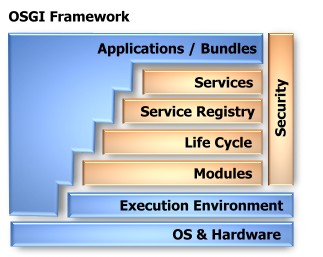
The Open Services Gateway Initiative OSGi is an independent, non-profit corporation working to define and promote open specifications for the delivery of managed services to networked environments, such as homes and automobiles. These specifications define the OSGi Service Platform, which consists of two pieces: the OSGi framework and a set of standard service definitions. The OSGi framework, which sits on top of a Java virtual machine, is the execution environment for services. The OSGi framework was originally conceived to be used inside restricted environments, such as the set-top box.

The work behind OSGi began in 1999, when embedded systems vendors and networking providers came together to create a set of standards for a Java-based service framework that could be remotely managed. In the beginning, it was seen as a service gateway for home management, telematics, and mobile environments. Now, the industry is starting to expand to serve desktop, enterprise, and mobile integration as well. Every leading enterprise application server provider is using or intends to use OSGi to allow applications to be adapted remotely.


The OSGi framework
The framework can be divided in two main elements:
a. A services platform: It involves interaction between three main actors, service providers, service requesters and a service registry. A service is described as a Java class or interface, the service interface, along with a variable number of attributes, the service properties. The service registry allows service providers to be discovered through queries formulated in an LDAP syntax. Service providers and requesters are part of an entity called a bundle that is both a logical as well as physical entity.

b. A deployment infrastructure: Physically, a bundle correspond to a delivery and deployment unit that is materialized by a JAR file along with a file that contains information about the bundle, the manifest file. The OSGi framework provides mechanisms to support continuous deployment activities. These deployment activities include installation, removal, update, starting (activation) and stopping (de-activation) of a physical bundle. Once a bundle is installed in the platform, it can be activated if deployment dependencies that are associated to the bundle are fulfilled.
Deployment activities are realized according to a well defined series of states corresponding to the physical bundle life-cycle. The activation or de-activation of a physical bundle results in the creation or destruction of a unique logical bundle, materialized by an instance from a class inside the bundle called a bundle activator. When the instance is created, the execution environment calls an activation method that signals the logical bundle that it is active. When the physical bundle is de-activated, the execution environment calls a de-activation method. When the logical bundle is active, it can publish or discover services and bind with other bundles by accessing the framework's services registry. It can also be notified from changes that occur in the framework by subscribing as an event listener.


OSGi programming
We will demonstrate OSGi programming based on the open source Knopflerfish OSGi framework which is easy to install and provides a great desktop GUI. Download the framework from http://www.knopflerfish.org. To start the Knopflerfish Framework, you can now simply double-click on the framework.jar.

Creating your First Bundle in 5 easy steps

1. In Eclipse, create a new Java Project and import framework.jar in the classpath.

2. Create a manifest.mf file in META-INF folder and add the bundle properties like
Bundle-Name, Bundle-SymbolicName, Bundle-Version, Bundle-Description, Bundle-Vendor, Bundle-Activator, Bundle-Category and Import-Package.
Bundle-Activator tells the framework which class is your Activator class, this is a kind of “main”
class for your bundle.
The Import-Package property tells the framework that our bundle needs to have access to all classes contained in the org.osgi.framework package.

3. Create an Ant build file.

4. Create the Activator class by implementing two methods, start(BundleContext bc) and stop(BundleContext bc) of the BundleActivator interface in the implementation package.  Next, we create a Thread subclass. Finally, we have to create a new thread while the bundle is started (in the start() method) and we have to stop the thread once the bundle is stopped.

5. Build and install your First Bundle using Knopflerfish. The bundle is automatically activated and you should see a new icon in the upper left window.

Creating your First Service in 5 easy steps

Repeat the above steps for creating a new bundle and then follow the steps below:
1. Update the manifest.mf file by adding an Export-Package property so that later other services will be able to retrieve the service interface and use it.

2. Create the Service Interface in the interface package.

3. Create the Service Implementation in the implementation package.

4. Create an Activator that registers the Service by using registerService() of the BundleContext object in the start(). All registering operations are done via methods in the BundleContext object. This object is the glue between our bundle and the framework.

5. Build and Install the Service Bundle

Using other Services in 4 easy steps

Repeat the above steps for creating a new service and then follow the steps below:
1. Update the manifest.mf File by adding a comma and a new package name to the Import-Package header. We now declare, that our bundle needs to have access to the new package. A framework will always check that this package is available to the bundle before the Activator is started.

2. Retrieve a Service with the help of ServiceReference object from the BundleContext's getServiceReference() method passing the name of the service interface as argument. Once we have a ServiceReference object, we use the getService() method to acquire the service implementation object, cast it to Service and use it.

3. Using a ServiceListener to Dynamically Bind Services by performing the following steps
a. Create a object name filter
b. Using this filter add a ServiceListener by using BundleContext's addServiceListener().
c. Get service references as given in step 2 by using this filter.
d. Loop through all the references to check the ServiceEvent state
if ServiceEventType is Registered then create a new thread of the Service
if ServiceEventType is Modified then stop this thread and create a new thread of the Service
if ServiceEventType is unregistered then stop the thread of the Service
4. Using a ServiceTracker to track Services with the help of ServiceTracker class which monitors services. It is done by creating a implementation class of ServiceTrackerCustomizer consisting of methods addingService(), modifiedService() and removedService() and passing this class object to create an object of ServiceTracker class.

JavaFX: Unifying Desktops, Mobiles and TV

Hi Java Programmers,

Greeting!! How are you doing? For this article the target audience is the group of Java Programmers looking forward to graphics and related development using JavaFX and have no prior knowledge of the same.


Introduction
JavaFX is an expressive rich client platform for creating and delivering rich Internet experiences across all the screens of your life. Be it a 15'' desktop CRT/LCD or a 7'' Java enabled Mobile or a 37'' T.V, JavaFX applications will  be omnipresent.

Key features:

a. One-stop-shop expressive content design and development platform across desktop, browser, mobile, and television with a unified development and deployment model.

b. Applications can be distributed across billions of devices through the power of Java including Mobile and TV.

c. JavaFX Mobile brings expressiveness to Java ME, a best way to bring expressive, feature-rich content to mobile and television devices.

d. In mobile devices, JavaFX builds on top of the existing Java ME platforms to reduce implementation costs for device manufacturers.

e. Dramatically shorten your production cycle for design and development by using JavaFX Production Suite to incorporate multimedia assets from popular third-party design tools.

f. Powerful runtime: Leverage the extreme ubiquity, power, performance and security of the Java runtime.

g. With Java SE 6 update 10 and beyond, you can drag-to-Install applications from your browser directly onto your desktop.

Implementations of JavaFX

1. Applications involving images and its deployment.
2. Animation.
3. Video streaming and related functionality.

Learning JavaFX


1. We need to download Netbeans IDE 6.9.1 which has JavaFX development capabilities along with PHP, JavaScript and Ajax, Ruby and Ruby on Rails, Groovy and Grails, and C/C++. For Windows Platform click here to download the IDE.

2. After the download and installation, for getting started immediately with an interesting program, click here.


Hope you will have fun, with JavaFX. Do post your comments on how did you find it!


Warm wishes,
Sunit Ronnie Ghosh

Monday, January 3, 2011

Scala Wala Bhaiyya

Hi Java Programmers,

Here, I am sharing a bit of information on Scala, which I thought would be interesting to share with you all.

Introduction
Scala is a general purpose programming language designed to express common programming patterns in a concise, elegant, and type-safe way. It smoothly integrates features of object-oriented and functional languages, enabling Java and other programmers to be more productive. Code sizes are typically reduced by a factor of two to three when compared to an equivalent Java application.

Scala is a pure object-oriented language. Scala is also a functional language. Scala is statically typed. Scala provides a unique combination of language mechanisms that make it easy to smoothly add new language constructs in form of libraries. Scala interoperates with Java and .NET.

Application in real world
At Twitter, the social networking service, Robey Pointer (An infrastructure engineer at Twitter) moved their core message queue from Ruby to Scala. This change was driven by the company's need to reliably scale their operation to meet fast growing Tweet rates.

Others:
Sony Pictures: middleware
Nature.com: infrastructure
SAP community: ESME company messaging
Reaktor: many different projects
Mimesis Republic: multiplayer games
EDF: trading


Seamless integration with Java
Existing Java code and programmer skills are fully re-usable. Scala programs run on the Java VM, are byte code compatible with Java so you can make full use of existing Java libraries or existing application code. You can call Scala from Java and you can call Java from Scala, the integration is seamless.

Learning Scala
Some Java programmers find Scala a little alien at first but soon enjoy the concise way they can express their ideas as programs. Less key-strokes to make. Type inferencing, everthing-is-an-object, function passing, and many other features cut away unneeded syntactic overhead. For the small price of learning some new syntax, anyone can write programs with the same ease that they did in Java and steadily gain in problem solving power.
The best way to learn Scala depends on what you know already and the way you prefer to learn things.
If you have several years of Java programming experience then click here for great resources to start with. There we have a video talk given by Martin Odersky, the creator of Scala, then we have a website to try out some scala code firsthand, and then we have links to nice programming books on Scala.


Present
The current version of Scala is 2.8.1. It was released on November 9, 2010. You can download windows installation zip file from here.  To know what has changed in the previous versions, click here.

Happy Scala!!
Sunit Ronnie Ghosh